

Digital Switchboard: How to Distribute Calls Across Your Team
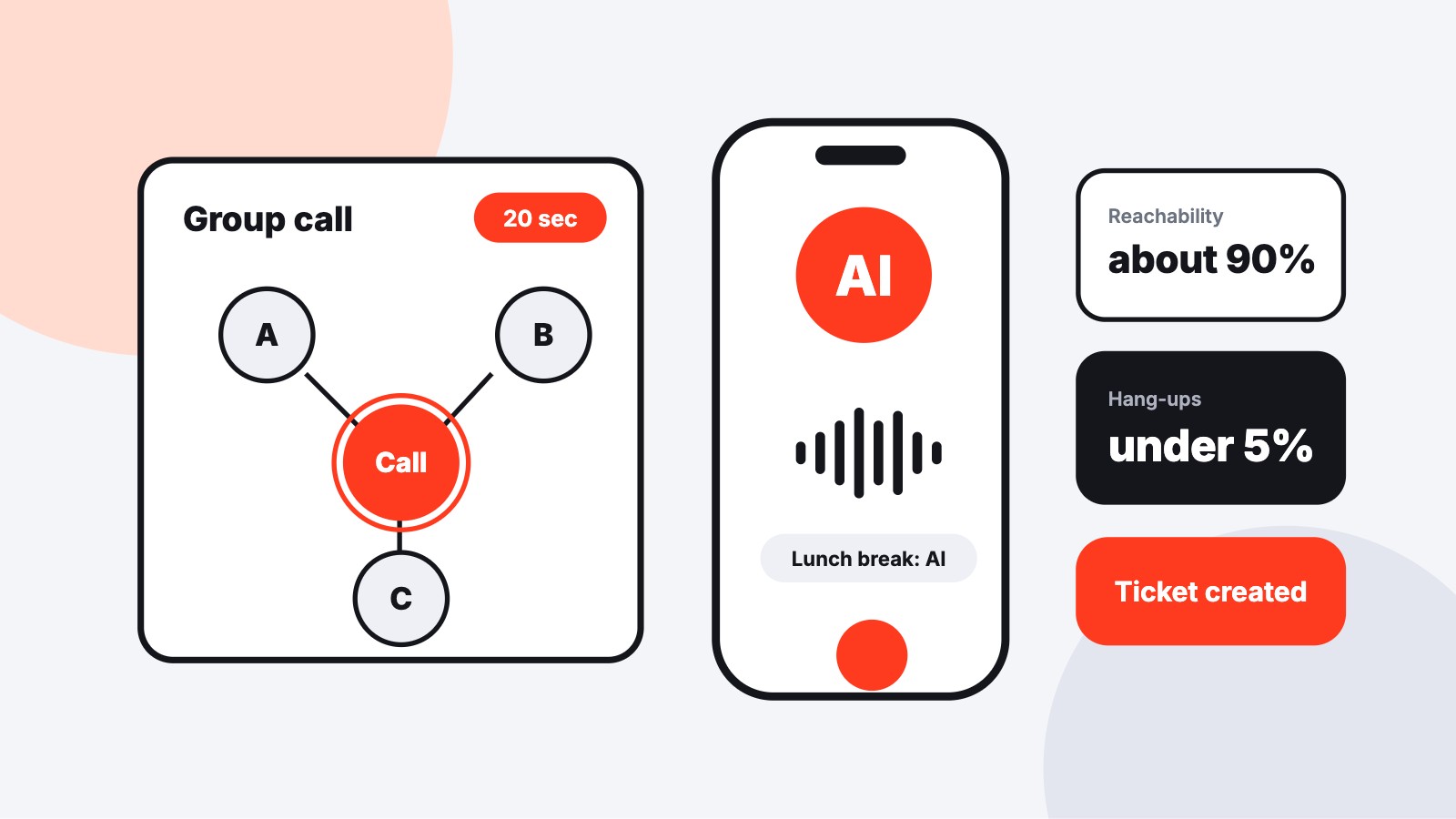
A digital switchboard does the work of the front desk in software: the phone system distributes calls across the team, and an AI phone assistant catches what nobody can answer. For this to work, every business needs a rule set that defines who picks up when and where every call ends up, even without an extra front-desk position.
What a digital switchboard really delivers today
The switchboard reliably handles four tasks; the fifth stays with the team. Technology can hold conversations, sort and document. In the end, a human still has to call back.
- Greeting works equally well around the clock, even when three lines ring at once on Monday.
- Asking for the reason for calling works reliably for appointments, opening hours or status questions; with nested cases, recognition becomes unreliable.
- Transferring works with stored responsibilities, also as a live handover with the conversation history and a classification of the request.
- Taking messages is more complete than with a slip of paper, because name, number, reason and next step land as a ticket.
- Organizing callbacks remains teamwork, because the technology creates the ticket, but a designated person has to call back.
How much follow-up work remains is determined by the integration: the more directly the assistant is connected to the calendar, CRM or ticketing system, the less the team has to retype. The ScaleTalk AI phone assistant is available around the clock and can be set up in a GDPR-compliant way in about 30 minutes, without anyone on the team having to program.
Building the rule set: overflow, lunch break and after hours, spelled out
A rule set organizes everyday operations: who rings when, for how long and where the call goes. Beforehand, you decide on which pattern the system distributes calls at all. The most important distribution patterns are:
- Group ring: all phones ring at the same time, ideal when everyone on the team can take any request.
- Round-robin ringing: one after another, when one person is mainly responsible and others step in.
- Skill-based routing: distributes by topic or expertise when responsibilities are clear.
- Announcement menu (IVR): at most three options per level, otherwise callers hang up early.
For most small teams, group ring as the default fits, complemented by time-based routing for breaks and after hours.
In brief: Time-based routing automatically switches the phone system between rule sets depending on time of day, weekday or public holiday. A small business gets by with one set for opening hours, one for the break and one for after hours.
Daytime overflow
Rule: group ring with a 20-second ring time (around four rings). If nobody picks up, the AI phone assistant takes over, asks for the reason for calling and creates a ticket for the team lead. Anyone who is sick or on vacation signs out and automatically drops out of the group ring.
A separate variant is worth it for Monday morning: one more person in the group ring and a 15-second ring time, so the start-of-week wave reaches the assistant faster.
Lunch break
Rule: from 12 to 2 p.m., the AI assistant takes over completely. It books standard appointments directly into the calendar, and anything more complex it creates as a callback ticket with the priority "this afternoon", which is worked through first at 2 p.m. One exception belongs firmly in the rule: if an action would change a contract or a payment, or the connected calendar is unreachable, the assistant hands over to a human or to the ticket.
After hours and night
Rule: after closing time as well as on weekends and public holidays, the assistant answers standard questions such as opening hours or address. For emergencies, you store keywords, in property management for example "burst water pipe" or "heating failed". If one of them comes up, the assistant forwards immediately to the on-call service. If nobody answers there, a second number rings automatically. All other requests land as a ticket that is in the inbox at 8 a.m.
This is how, for example, ScaleTalk's AI phone assistant for property management works: it classifies emergencies, forwards them to the emergency service and takes damage reports. Emergencies must never get stuck in a queue, so check this path before launch with a dedicated test call.
What the AI may pre-qualify and when a human must take over
The AI assistant pre-qualifies reliably: the category must be stored. Technically, it asks the questions you defined for each request, classifies the call and then decides: either it transfers live to a colleague and passes along category and history, or it ends the conversation and writes the appointment, callback request or ticket into the target system. In a car workshop, the AI books the tire change itself, and the question about a cost estimate for accident damage goes to the master mechanic as a callback.
For personal or complex requests, over 70% of consumers prefer a human. Field reports on voice agents consistently name the same borderline cases, which you set up as fixed handover triggers:
- Complaints: live to a designated contact person, without repetition.
- Price negotiations: callback ticket with the person who has pricing authority.
- Sensitive information: the AI takes the request and announces a callback, gives no information.
- Emotional matters: a death or serious damage goes directly to a human.
- Uncertain capture: dialect, connection, topic switches lead to handover with context.
Metrics checklist: how to tell the switchboard is working
Five metrics show whether the switchboard works, and your phone system itself provides most of them. The benchmarks come from call center practice. There are no dedicated benchmarks for practices, law firms or workshops, but they work as a guide anyway.
| Metric | Formula | Benchmark | Measurement with built-in tools |
|---|---|---|---|
| Reachability rate | answered ÷ incoming calls × 100 | around 90% | Call list: count answered, abandoned and rejected calls |
| Service level | Share of calls answered within 20 seconds | classically 80% in 20 seconds | Call statistics with ring or wait time per call |
| Abandonment rate | abandoned ÷ incoming calls × 100 | under 5% | Status "missed" or "abandoned" in the call list |
| First-call resolution rate | resolved at first contact ÷ all calls × 100 | around 70% | Ticket status or tally sheet "resolved on first call" |
| Average handling time | (talk + hold + after-call work time) ÷ calls | 3 to 8 minutes, depending on industry | Call duration from the statistics, estimate after-call work |
The 80/20 value is an industry convention with no legal basis. The German Telecommunications Act regulates queues only for premium-rate special numbers and names no target value for answering speed. Set your own service level just before the point where your abandonment rate noticeably rises. In many statistics, that point is at around 60 seconds of waiting time.
Phone system plus AI assistant, or call center software after all?
For most small teams, the phone system plus AI assistant is enough. Call center software only pays off with high volume, shift operations and service commitments. There is no fixed threshold in calls per day. What matters is the ratio of call volume to topic diversity: many similar calls favor automation, few complex ones argue against it.
These tipping points decide whether you stay with your system or upgrade:
- Many similar calls (appointments, status questions): the AI assistant handles most of it, the existing system is enough.
- Several agents in shifts: call center software with workforce management for staff scheduling.
- Contractual service commitments: real-time analytics and complete reporting are needed, as call center software provides them.
- Few, varied calls: AI setup exceeds the benefit, budget is better spent on team availability.
If you are thinking about switching systems: the cloud phone system fonial comes with skill routing and queues, is natively connected to ScaleTalk and costs from €3.90.
Cost range, as of 2026: Cloud phone systems without a call center module are available from around €4.90 to €7 per user per month. Call center software starts at about €9 per agent (LiveAgent) and reaches €60 to €120 per agent with enterprise providers such as Genesys or Five9 with AI routing and CRM integration. AI phone assistants are usually billed by call minutes, with typical monthly amounts in the two-digit to low three-digit range, driven by minute volume, integrations and the number of connected phone numbers.
Legally safe and frustration-free: announcements, GDPR and the most common mistakes at launch
Transparency from the start: callers must know what is happening. If calls are recorded or transcribed, the greeting says so and obtains consent. With the provider, you sign a data processing agreement under Art. 28 GDPR that records server location and retention periods. ScaleTalk operates servers in Frankfurt, works 100% GDPR compliant and is made in Germany.
AI disclosure: mandatory since August 2, 2026
Callers must learn that they are speaking with an AI, unless that is obvious anyway. This obligation from Article 50 of the EU AI Act has applied since August 2, 2026 to every AI phone assistant in the EU and thus directly in Germany as well. According to IHK Cologne, one clear greeting sentence at first contact is generally sufficient, for example "You are speaking with the practice's digital assistant". You do not have to label every single utterance.
Queues: when Section 115 TKG applies
Section 115 TKG requires additional announcements only for special numbers such as 0180 or 0900. There, the caller must learn at the start of the queue the expected wait time and whether a flat price applies or the queue is free of charge. With normal landline and mobile numbers, as most practices, workshops and law firms use, queues without these additional obligations are permitted. Announcing the wait time is still a good habit.
Announcements and typical launch mistakes
For announcements, one basic rule applies: every announcement states when the team is available again and what is happening with the call now. A sentence such as "Our team is back for you from 2 p.m., our assistant is taking your request now, we will get back to you today" keeps callers on the line. You fix the most common launch mistakes with one setting each:
- Long ring times: 15 to 20 seconds, then the assistant takes over.
- Queues: set a maximum wait time, then offer a callback automatically.
- Absences: check every Monday or link to the team calendar.
- Tickets: each needs a name and a deadline, otherwise they pile up.
Conclusion: from rule set to lived routine
The technology is rarely the obstacle, but the missing test phase before going live often is. The settings themselves are quickly done. Whether every call ends up with a human or in a ticket only the test shows. So run simulated complaint and emergency calls for two weeks, including strong dialect, before the rule set goes live for all callers.
After 30 days, compare the four core values from the checklist with the starting point and discuss them in the team. Name one person who maintains the rule set and enters changes, so that order still holds after the third vacation season.
Frequently asked questions about the digital switchboard
Two to four people is a practical range for small teams. With more devices, nobody quickly feels responsible, and every call pulls several people away from their work at once. Larger teams are better split into two groups that ring in turn.
Usually yes. You set time-based routing, group ring and ring duration in cloud phone systems via the web interface, and emergency keywords and conversation flows in the AI assistant's dashboard. Decide who makes changes so that no conflicting versions arise.
Yes, via the cloud phone system's app or a stored mobile number, mobile phones ring along in the group ring. For fitters or carers on the road, it is advisable to add a separate stage at the end of the sequence so they are only disturbed in case of real overflow.
After the maximum wait time that you set in the system, the assistant takes over or offers a callback. Set this limit well below 60 seconds, because the hang-up rate rises noticeably after that. That way nobody hangs in the loop endlessly.
Treat public holidays like after-hours: emergency path active, everything else as a ticket. Store the public holiday calendar of your federal state in the time-based routing, as holidays differ by region. Enter bridge days and company holidays by hand once at the start of the year.
The assistant transfers the call if a colleague is free, otherwise it creates a callback request with a deadline. Store requests such as "I want to speak to an employee" as a fixed handover trigger. The caller learns when to expect the callback.
Catch every call, try ScaleTalk for free now
AI telephony for practices, workshops, law firms and agencies, set up in a GDPR-compliant way. Servers in Germany.