

How does an AI phone assistant work? The technology behind it, explained simply
Transcriber, AI model, speech synthesis, phone provider: what happens technically when an AI phone assistant answers your call?
"That's surely some kind of robot, right?" We hear that all the time. And honestly, the reaction is understandable. Most people know automated phone systems as annoying voice menus: "Press 1 for billing questions..."
But a modern AI phone assistant has about as much in common with that as a smartphone has with a rotary phone. The technology behind it is fundamentally different. And once you understand how it works, you can judge much better what it can do, where its limits are and whether it makes sense for your business.
The four building blocks
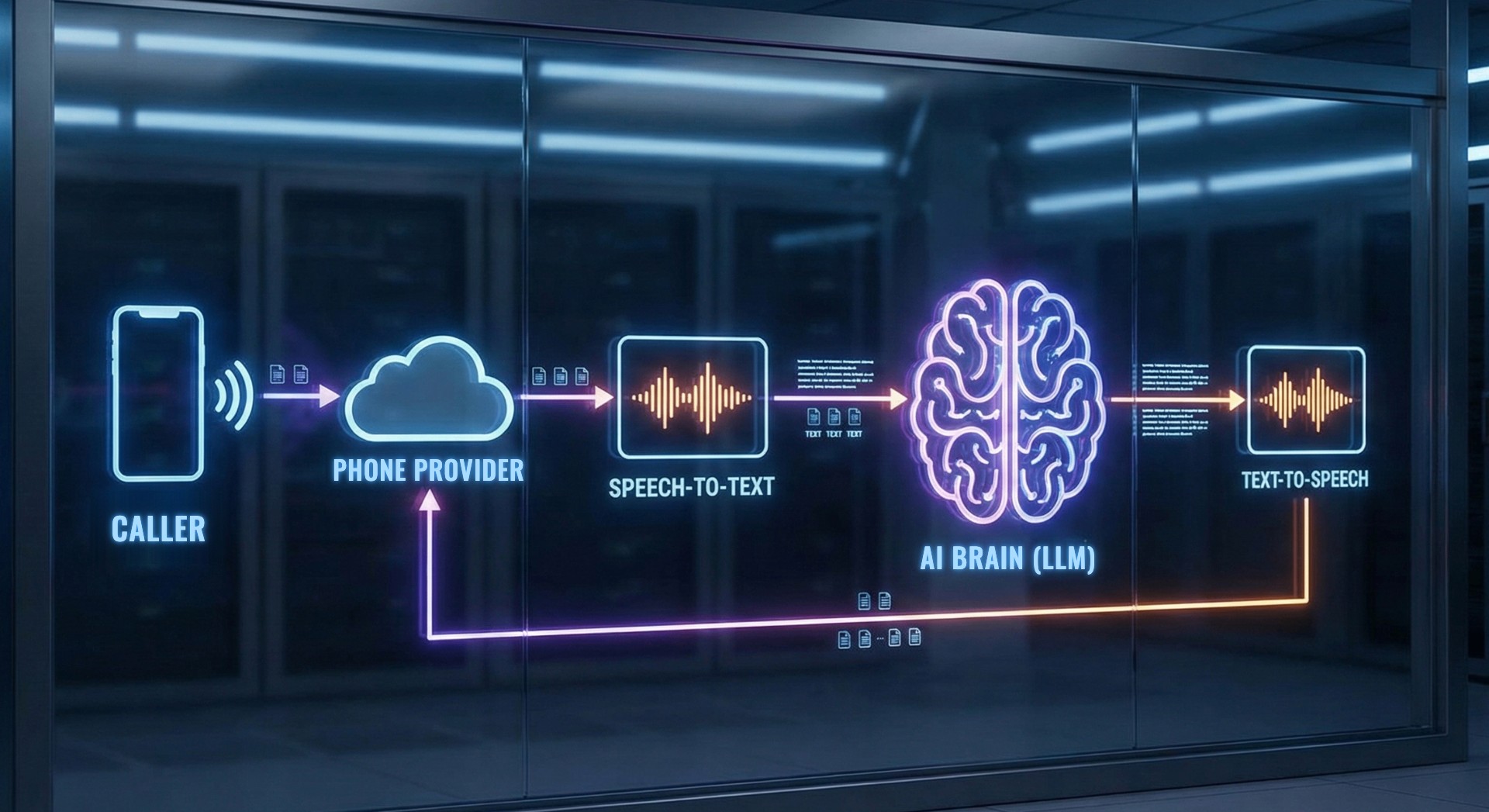
An AI phone assistant consists of four components that work together in real time. Every second of the conversation runs through exactly this cycle.
Phone provider
The connectionProvides the phone number and routes the call to the AI system via SIP or WebRTC.
You buy a number or set up call forwarding. Invisible to the caller.
Transcriber (STT)
The earConverts speech to text in real time, despite dialects, accents and background noise.
Neural networks trained on millions of hours of speech data. The quality here determines everything.
AI model (LLM)
The brainUnderstands the intent, decides on the next action and formulates a context-aware answer.
Works with the full conversation history and the system prompt. No canned scripts.
TTS model
The voiceTurns the text response into natural-sounding speech, with emphasis, pauses and emotional nuance.
Modern TTS like Cartesia Sonic no longer sounds like a robot, but like a real conversation.
Building block 1: The phone provider
Before any technology comes into play, the agent needs a phone number and a connection to the telephone network. This happens via SIP connections or WebRTC, standard protocols for internet telephony. Completely invisible to you as a user: the agent has a number and answers calls.
With ScaleTalk, you can buy a German phone number directly on the platform and assign it to your agent with one click. Or you forward your existing business number via call forwarding.
Building block 2: The transcriber (speech-to-text)
As soon as the caller speaks, the transcriber converts speech to text in real time. That sounds simple but is technically demanding: background noise, dialects, speaking speeds, all within a few milliseconds.
Modern transcribers are based on neural networks trained on millions of hours of speech data. When someone says "I'd like an appointment on Friday at ten", the transcriber recognizes that "ten" here is a time of day. The quality of the transcriber is the foundation: errors here propagate through the entire conversation.
Building block 3: The AI model (LLM)
The AI model receives the transcribed text, the entire conversation history and the system prompt. From that it derives: What is the intent? What information is missing? Which tool should it use?
It doesn't answer from canned scripts, but freely and in context. When someone says "My heating is making strange noises, can you come by?", the model recognizes: maintenance appointment, not an emergency, even though the word "appointment" never came up.
Temperature: creativity vs. accuracy
An important parameter: the lower the temperature, the more closely the AI sticks to the guidelines. The higher it is, the more freely it answers. For most use cases, a low to medium value is recommended.
Building block 4: The TTS model (text-to-speech)
Forget the robot voices of 2010. Modern TTS models produce natural emphasis, pauses and emotional nuance. ScaleTalk uses Cartesia with the Sonic model, hosted on European servers.
What makes it special: the voice can convey real emotion. Enthusiastic emphasis for good news, an empathetic tone for problems. Controlled via the system prompt.
The system prompt: the briefing for your agent
The four building blocks are the stage. The system prompt defines the show: a briefing in natural language:
Name, company, role. “You are Anna, the digital assistant of Example Inc.”
Friendly, professional, informal or formal address. Whether it should ask follow-up questions or answer directly.
Book appointments, answer questions, create tickets, transfer to humans.
No price negotiations, no confirming contracts. For certain topics → human.
No code, no programming. Like briefing a new employee on their first day, except this one knows everything by heart after five minutes and never forgets anything.
What happens during the call: tools & integrations
An AI agent that can only talk is nice. It becomes truly useful when it can also do things.
Calendar integration
Connect Google or Outlook calendar in one click. The agent checks free slots, suggests appointments and books directly.
“I’d like a consultation appointment, ideally Friday.” → Agent checks calendar → suggests 10 am or 2 pm → books including name and email.
API requests
Send and retrieve data from your CRM, ticketing system or automation platforms in real time during the conversation.
Customer describes a problem → agent captures the data → creates a support ticket via webhook → “I’m entering the ticket in the system.”
Knowledge base
Upload PDFs, Word docs and Excel spreadsheets. The agent searches them in real time and answers questions from them.
Customer asks about the backup strategy → agent finds the answer in the 50-page IT security document → answers immediately.
How a call works, step by step
Call comes in: provider forwards the audio stream
Agent greets: TTS speaks the configured opening message
Caller speaks: transcriber converts speech to text
AI model understands: analyzes text, history and system prompt
Agent acts: runs a calendar check or API call
Agent responds: TTS converts the answer to natural speech
The loop repeats until the conversation ends
Post-processing: summary, appointment, ticket
From call to first response: less than a second.
Conclusion
There is no magic behind an AI phone assistant, just a well-thought-out interplay of four technologies: phone provider, transcriber, AI model and speech synthesis. On top of that come tools for calendars, APIs and knowledge bases that turn the agent from a conversation partner into a real team member.
The technology is here. It works. And it is easier to set up than most people think.
Want to try it yourself?
Test ScaleTalk for free, with no setup, no credit card, in just a few minutes.